
For companies ready to scale AI
One AI platform for your team, knowledge and agentic workflows.
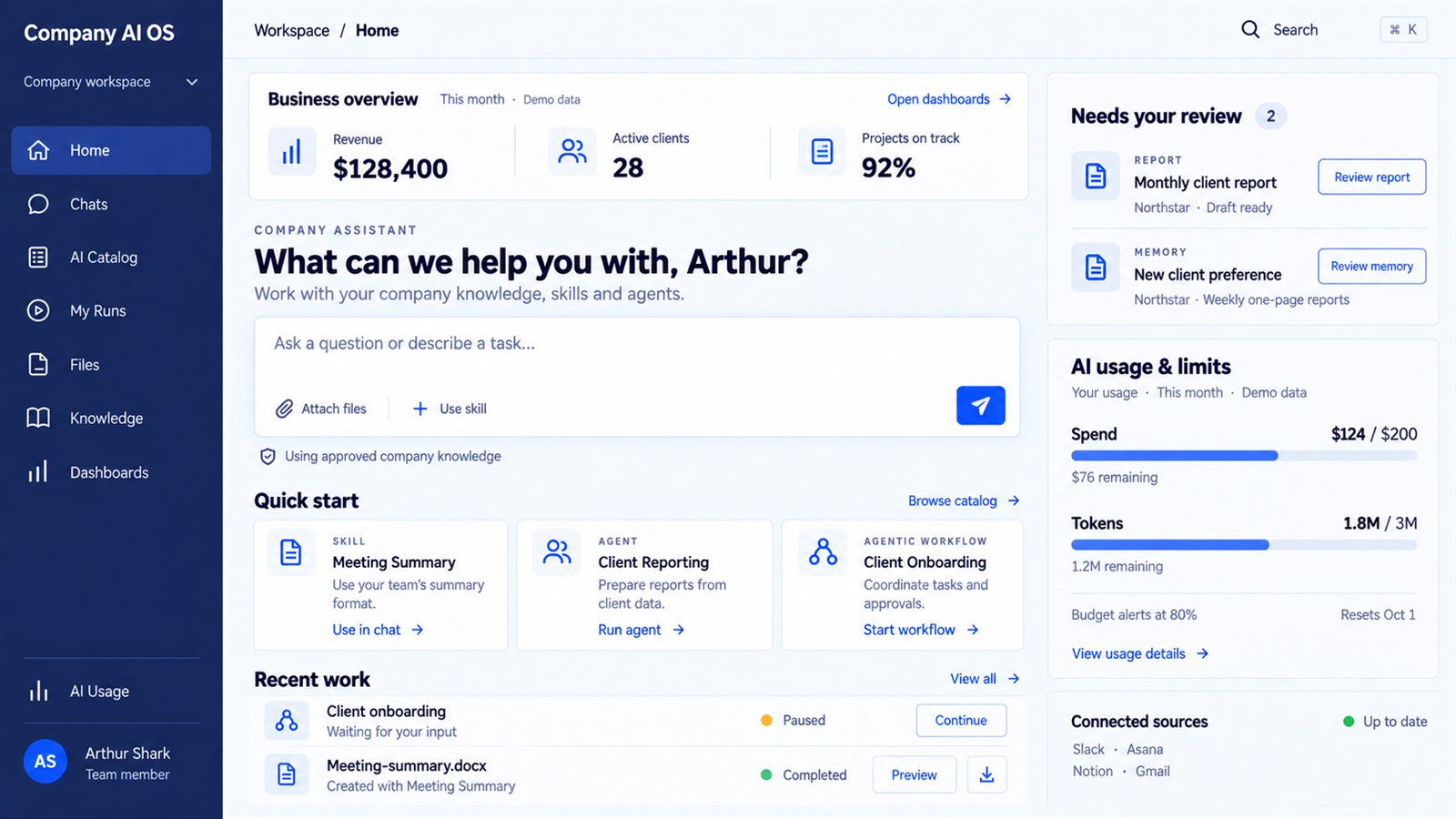
Connect your team, tools and company knowledge in one AI platform. Run agentic workflows with clear controls, reuse approved learning and measure results. Your data, context and custom workflows remain yours.
- Unified AI workspace
- Secure connections
- Shared knowledge
- Governance and control
AI success creates a new bottleneck.
AI adoption and productivity keep growing — but integration and trust remain the blockers. The more teams use AI, the more shared knowledge, clear rules and reliable processes matter.
of organizations are scaling AI company-wide — McKinsey
of small businesses have AI fully embedded in core operations — Goldman Sachs
of SMB leaders cite data privacy and security as an adoption concern — Upwork
The standalone AI ceiling
Signs your company is outgrowing standalone AI.
When AI tools grow separately, every new workflow repeats the setup — and leadership loses the view.
Repeated setup, repeated corrections
Each new workflow rebuilds the same connections and repeats earlier corrections. New processes need more setup and rework every time.
AI expands faster than control
Owners, access rules, approvals and budgets differ across tools — leadership struggles to control access, actions and spending.
AI uses inconsistent company knowledge
Separate copies of SOPs, client details and rules drift out of date. Conflicting answers create rework and weaken trust.
Company AI depends on individuals
Prompts, context and workflows sit in personal accounts. Work becomes harder to share, maintain or hand over.
More AI, unclear business value
Usage grows, but time saved, quality and total cost are not tracked — so nobody can see what to expand, improve or stop.
Company AI OS gives these efforts a shared foundation for access, knowledge, control and improvement.
What it is — and is not
What Company AI OS is. And what it is not.
An operating layer for company AI — not another tool subscription.
- 01It is one workspace where your team finds and uses approved company AI
- 02It is a shared context layer: company knowledge, within each user's permissions
- 03It is an engine that runs business processes across AI, people and tools
- 04It is governance: owners, access rules, approvals and budgets in one place
- 05It is not a product you buy off the shelf — it is tailored to your processes and stack
- 06It is not a replacement for your existing software — it connects and improves what your team already uses
- 07It does not retrain models — learning is saved as approved, versioned, owner-controlled knowledge
- 08It is not a lock-in: your data, context and custom workflows remain yours
How it is built
Six core capabilities, one coherent system.
One platform covering how people work with AI, how company AI gets work done, and how it improves over time.
Unified Company AI Workspace
One place to find approved company AI, start work and review results — assistants, agents, workflows, dashboards — with role-based access.
Shared Company Context
Documents, SOPs, CRM, project tools and client knowledge connected into one context, used within access rules and with source references.
Agentic Workflows Engine
Business processes run across AI, people and tools: reusable agents, schedules and triggers, human review where needed, recovery when interrupted.
AI Governance & Control
Complete AI inventory, named owners, permissions, approval steps, model routing, budgets, audit trail, versions and an emergency stop.
Organizational Memory & Learning
Approved decisions, corrections and client preferences are saved, owner-reviewed and versioned — then applied to relevant future work.
AI Performance & Optimization
Quality, accuracy, correction rates, latency, cost per task, adoption and business KPIs — baseline before the build, monthly reporting after.
Core capability 2 · Shared Company Context
Connected once. Used everywhere.
Company documents, tools and client knowledge flow into one shared context — and every AI capability draws from it, within each user''s permissions and with clear source priorities.
- Knowledge Assistant
- Reusable connections
- Access follows permissions
- Updated company knowledge
- Clear source priorities
What the business gets
Measured across capacity, quality, cost and risk.
We agree the measures that matter to your business, record the starting point before the build, and track progress from month one.
Capacity
Less time finding information and tools. Fewer manual handoffs. Time from request to completion, and processes completed per week, become visible and improvable.
Quality
Fewer errors from outdated information. More outputs meeting company standards. Repeated corrections on comparable work drop as approved learning is reused.
Cost
Total cost per completed task, model and tool usage, human review time, and spend on unused or duplicate AI — one view instead of scattered invoices.
Risk
Every process with a named owner. Actions with required approvals. Access or policy violations, budget breaches and time-to-stop-a-process all measured.
The economics of reuse
Each new workflow costs less than the last.
The AI OS Foundation creates a shared starting point — integrations, context, permissions, testing and monitoring. Every later workflow reuses it, so new work is scoped only to what is genuinely new.
Illustrative build-cost structure, not a forecast. Platform and usage costs continue; reuse depends on scope.
Shared setup carries over to every new workflow.
Start from what already works instead of from zero.
Fix once, test the impact on each process.
New workflow cost = process setup + genuinely new requirements.
Featured client result
How Curve turned AI ambition into a quantified roadmap.
Curve was already experimenting with AI. The challenge was deciding what to build, how to sequence the work and where the economics justified investment. A three-week AI Business Scan created a decision-ready view of the opportunity — and the architecture to scale it.
Potential value was modeled from discovery inputs and agreed assumptions. Actual results depend on implementation, adoption and operating conditions.
Ranked across 10 candidate use cases in the three-week Curve scan.
Modeled monthly capacity across reporting, research and intake work.
Every use case scored for value, feasibility and adoption.
From kickoff to a decision-ready, costed plan.
How implementation runs
You own the company-specific assets. We maintain the platform.
A low-risk path: a one-time foundation, then an ongoing engagement that grows your AI OS. Scope, fees and usage costs are agreed after the diagnostic.
AI OS Foundation
- Agreed integrations and connections
- The first agentic workflow live
- Baseline recorded: time, cost, error levels
- Shared context and governance configured
Shark AI Control Plane
- Platform access and maintenance
- Monitoring
- evaluation and reporting
- Versions, updates and rollback
- Named owners and support path
Managed AI Operations & new workflows
- Run, measure and improve company AI
- New agentic workflows added in sequence
- Each scoped, priced and prioritized separately
- Adoption support and enablement
FAQ
Common questions.
Next step
Turn isolated AI wins into a company-wide capability.
Most engagements start with a short, fixed-fee diagnostic. A 30-minute call is enough to see whether the AI OS route fits your company.
Where to go next.
- Not sure where AI pays off yet? Start with the Business AI Accelerator — the Business Scan is the natural first step into the AI OS.
- Founder still building AI confidence? The Founder AI Accelerator builds it one-on-one, with a personal assistant on your own server.
- Want to see the agents first? Browse the AI Agents Library — eight production agents, each with metrics and a workflow diagram.